

English
Siemens S7 Configuration
Pulse reads Siemens SIMATIC S7 PLCs using the S7 communication protocol. A PLC is added as a data source: one connection that carries every value Pulse reads from that machine.
There are two S7 modes, and this is the classic one
This page covers reading a PLC by absolute address (DB1.DBD4), which works on every S7 family and needs PUT/GET communication enabled on the controller.
An S7-1200 from firmware V4.5 or an S7-1500 from V2.9, with its project loaded by TIA Portal V17 or later, can instead be read by tag name — "DB_Line".Speed — with nothing switched on and with a browsable symbol tree. See Symbolic S7.
Adding an S7 Data Source
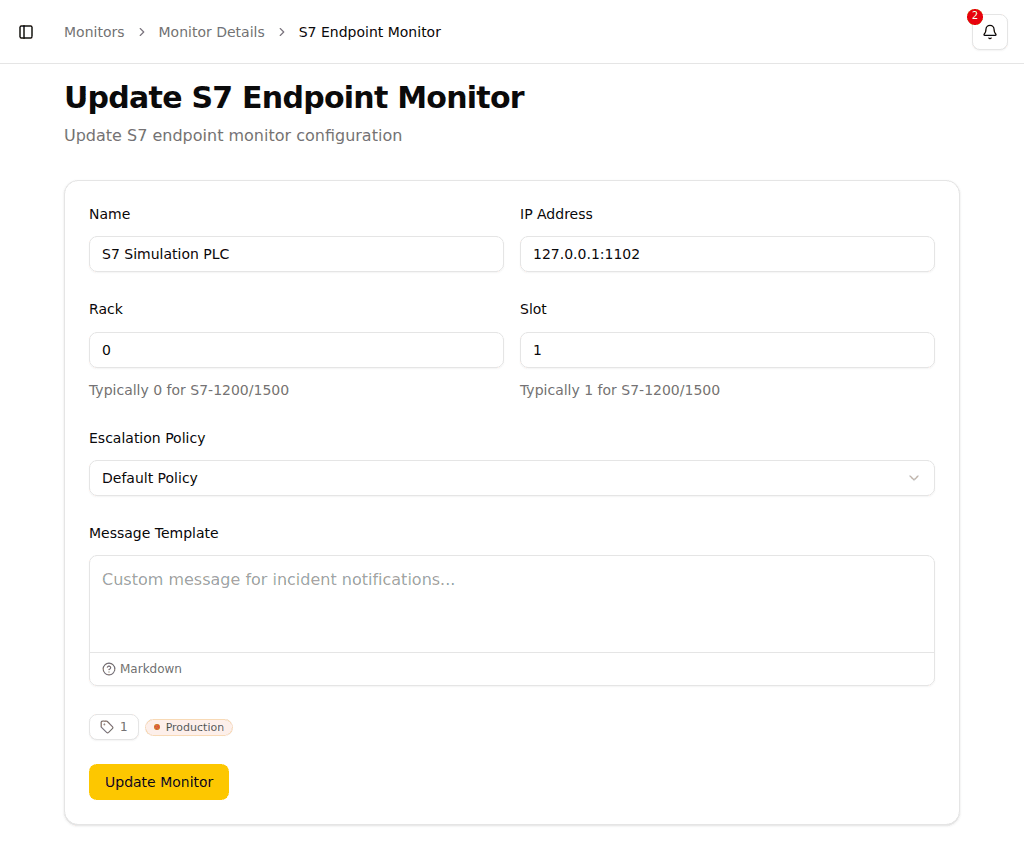
- Navigate to Data sources → S7 in the sidebar and click New data source
- Choose Siemens S7 from the menu. The dialog that opens asks which kind of CPU: choose Classic — by absolute address
- Configure the connection:
| Field | Description | Typical Value |
|---|---|---|
| Name | A descriptive name for the source | PLC Line 1 |
| Address | The PLC's IP address or hostname | 192.168.1.50 |
| Rack | PLC rack number | 0 |
| Slot | PLC slot number | 1 |
| Read interval (seconds) | How often every data point of this source is read | 10 |
| Acquire from this data source | Switch this off to stop polling without deleting the source | |
| Tags | Categorize the source; every data point inherits its tags | |
| Alert me when this source is unreachable | Creates a monitor alongside the source (see below) |
Pulse connects over ISO-on-TCP on its standard port, so no port needs to be configured.
Adding from device discovery
If you arrive here from Device Discovery by clicking Add on a found device, the Name, Address, Rack, and Slot are already filled in from the scan results. Review them and proceed with the remaining fields.
Rack and Slot Values
Common configurations for Siemens PLCs:
| PLC Type | Rack | Slot |
|---|---|---|
| S7-1200 | 0 | 1 |
| S7-1500 | 0 | 1 |
| S7-300 | 0 | 2 |
| S7-400 | 0 | 2 or 3 |
Being Alerted When the PLC Goes Down
Alert me when this source is unreachable is ticked when you add a source. It creates a condition monitor named after the source — PLC Line 1 unreachable — that raises an incident once Pulse stops getting readings from it. Pick the escalation policy it should use in the field below the tick box.
From the moment it exists, it is an ordinary monitor: rename it, mute it, change its escalation policy, edit its condition, or delete it, all from the monitor list. Untick the box if nobody should be paged for this particular PLC.
Adding Data Points
The individual values in PLC memory are data points of the source. The source's detail page lists every one Pulse reads, with its S7 address, last value, last sample time, and reading quality.
To declare a new data point, open the source's detail page and choose Add data point above the Data points table. The dialog asks for:
- Address — the S7 address in the same syntax the sampler reads, e.g.
I0.0,MW10, orDB1.DBD4. - Data type — how Pulse interprets the raw PLC memory at that address (see Data Types below).
The address and data type must agree: a DBW (Word) address holds a 16-bit value, so it pairs with Word or Int, not with Real. Pulse starts reading the new data point on the source's next poll.
To declare many data points at once from a spreadsheet, use Import from the action menu (⋯) next to it. See Importing from CSV for the full column reference, including the optional threshold columns that create a condition monitor alongside each data point.
Use the search box above the data points table to find a specific point by address or name. The search runs on the server, so it reaches all declared data points, not only the current page.
Alerting on a Tag Value
To alert on a data point, build a condition and attach a condition monitor to it. A condition compares readings against thresholds, aggregates them over a time window, and can combine several of them — including a reading and its source's reachability in one rule, so a PLC that drops off the network raises the one incident that says so instead of one per value read from it.
The source's detail page shows a Monitors section listing every condition monitor that alerts on any data point of this source. Click a monitor to open its detail page. A source with no monitors alerts on nothing; that section says so explicitly — a useful reminder that readings are being collected but nobody is paged when they go wrong.
Each row in the data points table also shows which monitors alert on that specific point. A single monitor appears as an icon button that opens it directly; when two or more monitors alert on the same point, the button shows the count and opens a picker listing them by name.
Each row also has an Open in Query action in its context menu (right-click or the ⋮ button) that takes you to the Query page pre-aimed at that data point, so you can explore its reading history without building the query from scratch.
Data points build up a history only while you keep them. Use Keep on the source's detail page for the values you want to chart and query over the long term; the rest stay readable for 24 hours.
S7 Address Format
S7 addresses follow the pattern DBx.DByz where:
DB-- Data Block prefixx-- Data Block numbery-- Data type:B(Byte),W(Word/2 bytes),D(DWord/4 bytes)z-- Byte offset within the data block
Examples:
| Address | Description |
|---|---|
DB1.DBW0 | Word at offset 0 in Data Block 1 |
DB2.DBD4 | Double word at offset 4 in Data Block 2 |
DB10.DBB0 | Byte at offset 0 in Data Block 10 |
Data Types
Each S7 data point carries a data type that tells Pulse how to interpret the raw PLC memory at its address:
| Data Type | Description |
|---|---|
| Bit | Single boolean value (0/1) |
| Byte | Unsigned 8-bit integer |
| Word | Unsigned 16-bit integer |
| DWord | Unsigned 32-bit integer |
| Int | Signed 16-bit integer |
| DInt | Signed 32-bit integer |
| Real | 32-bit floating point number |
The address and the data type must agree: a DBW (Word) address holds a 16-bit value, so it pairs with Word or Int, not with Real.
TIP
Refer to your PLC program documentation for the correct data block numbers, offsets, and data types for the values you want to read.